> ## Documentation Index
> Fetch the complete documentation index at: https://api-doc.vncps.com/llms.txt
> Use this file to discover all available pages before exploring further.
# 豆包语言模型 API
> 使用豆包语言模型进行图文理解和对话
## 支持的模型
豆包语言模型,支持图文理解和对话功能
轻量版豆包模型,快速响应
极速版豆包模型,超快响应
视觉理解豆包模型,专注图像理解
思考模式豆包模型,深度推理能力
代码专用豆包模型,编程辅助
GLM-4-7 语言模型
豆包视觉嵌入模型
豆包 2.0 专业版,更强大的能力
豆包 2.0 轻量版
豆包 2.0 迷你版,极小体积
豆包 2.0 代码预览版
## 图文理解对话
通过图片和文本提示与模型进行对话交互。
**配置说明:**
* 将 `api.xxx.com` 替换为您的实际 API 域名
* 将 `sk-xxx` 替换为您的 API 密钥(可在控制台获取)
```bash cURL theme={null}
curl https://api.xxx.com/v1/chat/completions \
-H "Content-Type: application/json" \
-H "Authorization: Bearer sk-xxx" \
-d $'{
"model": "doubao-seed-1-6-251015",
"messages": [
{
"content": [
{
"image_url": {
"url": "https://ark-project.tos-cn-beijing.ivolces.com/images/view.jpeg"
},
"type": "image_url"
},
{
"text": "图片主要讲了什么?",
"type": "text"
}
],
"role": "user"
}
]
}'
```
```json Response theme={null}
{
"id": "chatcmpl-xxx",
"object": "chat.completion",
"created": 1765250822,
"model": "doubao-seed-1-8-251228",
"choices": [
{
"index": 0,
"message": {
"role": "assistant",
"content": "这张图片展示了..."
},
"finish_reason": "stop"
}
],
"usage": {
"prompt_tokens": 1234,
"completion_tokens": 567,
"total_tokens": 1801
}
}
```
## 参数说明
### 必填参数
| 参数名 | 类型 | 必填 | 说明 |
| ---------- | ------ | -- | -------------------------------- |
| `model` | string | ✅ | 模型名称,使用 `doubao-seed-1-8-251228` |
| `messages` | array | ✅ | 消息数组,包含对话内容 |
### Messages 参数结构
| 参数名 | 类型 | 必填 | 说明 |
| --------- | ------------ | -- | ---------------------------------------------- |
| `role` | string | ✅ | 角色,可选值:`user`(用户)、`assistant`(助手)、`system`(系统) |
| `content` | array/string | ✅ | 消息内容,支持文本或多模态内容数组 |
### Content 内容类型
#### 文本内容
```json theme={null}
{
"type": "text",
"text": "你的文本内容"
}
```
#### 图片内容
```json theme={null}
{
"type": "image_url",
"image_url": {
"url": "https://example.com/image.jpg"
}
}
```
**图片格式支持:** 支持 HTTPS URL 格式的图片地址
## 使用示例
### 关闭思考模式
豆包语言模型默认开启思考模式。如需关闭,可在请求中添加 `thinking` 参数并设置为 `disabled`。
```bash cURL theme={null}
curl https://api.xxx.com/v1/chat/completions \
-H "Content-Type: application/json" \
-H "Authorization: Bearer sk-xxx" \
-d '{
"model": "doubao-seed-1-6-251015",
"messages": [
{
"role": "user",
"content": [{
"type": "text",
"text": "请简单介绍大引擎Ark平台"
}]
}
],
"thinking": {
"type": "disabled"
}
}'
```
```json Response theme={null}
{
"id": "chatcmpl-xxx",
"object": "chat.completion",
"created": 1736410123,
"model": "doubao-seed-1-6-251015",
"choices": [
{
"index": 0,
"message": {
"role": "assistant",
"content": "Ark平台是火山引擎提供的大模型服务平台..."
},
"finish_reason": "stop"
}
],
"usage": {
"prompt_tokens": 15,
"completion_tokens": 82,
"total_tokens": 97
}
}
```
**思考模式配置:** 设置 `"thinking": {"type": "disabled"}` 可以关闭模型的思考过程,直接获得答案。适用于需要快速响应的场景。
### 纯文本对话
```bash cURL theme={null}
curl https://api.xxx.com/v1/chat/completions \
-H "Content-Type: application/json" \
-H "Authorization: Bearer sk-xxx" \
-d '{
"model": "doubao-seed-1-6-251015",
"messages": [
{
"role": "user",
"content": "你好,请介绍一下自己"
}
]
}'
```
### 多轮对话
```bash cURL theme={null}
curl https://api.xxx.com/v1/chat/completions \
-H "Content-Type: application/json" \
-H "Authorization: Bearer sk-xxx" \
-d '{
"model": "doubao-seed-1-6-251015",
"messages": [
{
"role": "user",
"content": "今天天气怎么样?"
},
{
"role": "assistant",
"content": "抱歉,我无法获取实时天气信息。"
},
{
"role": "user",
"content": "那你能做什么?"
}
]
}'
```
## 响应说明
### 成功响应
| 字段名 | 类型 | 说明 |
| --------- | ------- | -------------------------- |
| `id` | string | 对话 ID |
| `object` | string | 对象类型,固定为 `chat.completion` |
| `created` | integer | 创建时间戳 |
| `model` | string | 使用的模型名称 |
| `choices` | array | 模型生成的回复选项 |
| `usage` | object | Token 使用情况 |
### Choices 结构
| 字段名 | 类型 | 说明 |
| --------------- | ------- | -------------------------------- |
| `index` | integer | 选项索引 |
| `message` | object | 消息内容 |
| `finish_reason` | string | 结束原因:`stop`(正常结束)、`length`(长度限制) |
### Usage 结构
| 字段名 | 类型 | 说明 |
| ------------------- | ------- | ---------- |
| `prompt_tokens` | integer | 输入 Token 数 |
| `completion_tokens` | integer | 输出 Token 数 |
| `total_tokens` | integer | 总 Token 数 |
请注意 Token 使用量,合理控制对话长度以避免超出配额。
## 在 Cursor 中配置
如果您需要在 Cursor 编辑器中使用豆包语言模型,可以按照以下步骤进行配置。
在 Cursor 中打开设置页面,找到模型配置选项(Models > Model Names)。
按照以下配置添加豆包模型:
* **模型名称**: 输入 `doubao-seed-1-8-251228` 并启用开关
* **API Keys**: 在 OpenAI API Key 中输入您的密钥(格式:`sk-xxx`)
* **Override OpenAI Base URL**: 设置为 `https://api.xxx.com/v1`
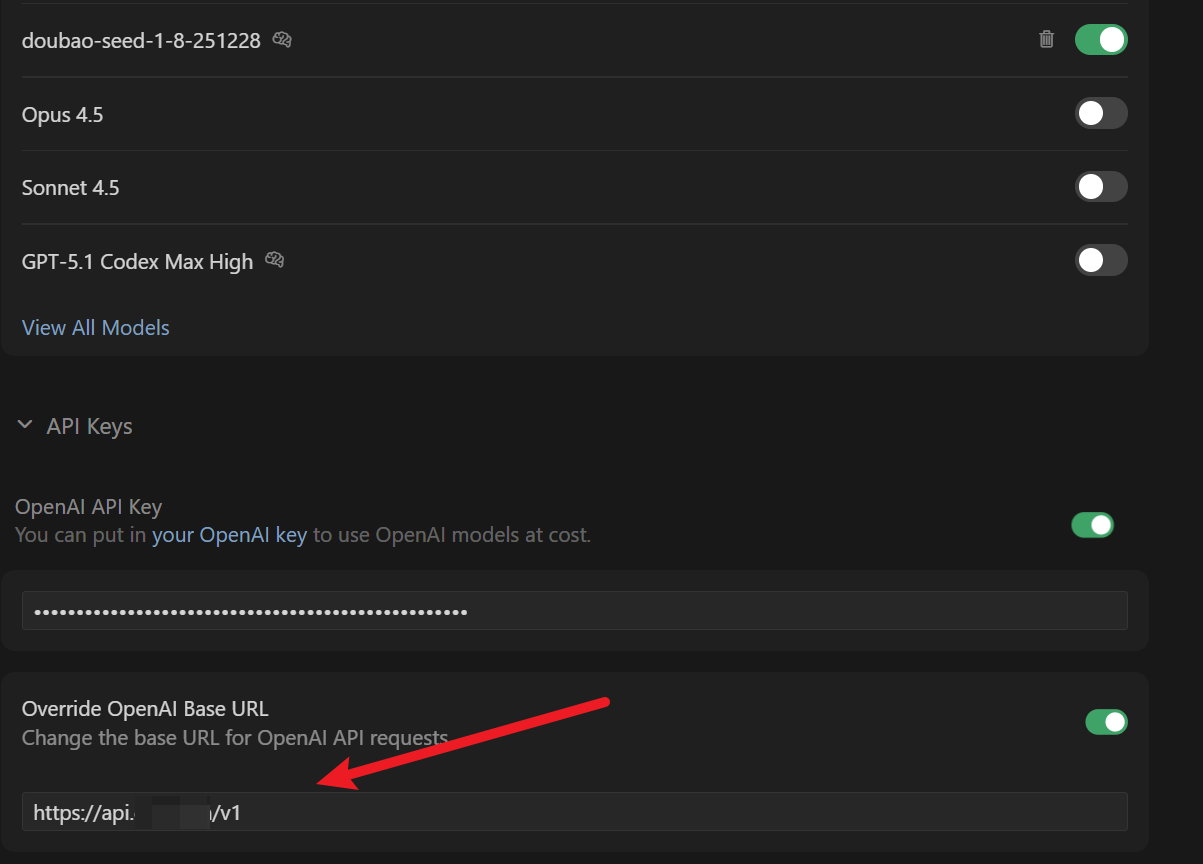 配置完成后,启用模型开关,即可在 Cursor 的对话框中选择使用豆包语言模型。
配置完成后,您可以在 Cursor 的 AI 对话功能中选择 `doubao-seed-1-8-251228` 模型进行代码辅助和问答。该模型支持图文理解能力。
配置完成后,启用模型开关,即可在 Cursor 的对话框中选择使用豆包语言模型。
配置完成后,您可以在 Cursor 的 AI 对话功能中选择 `doubao-seed-1-8-251228` 模型进行代码辅助和问答。该模型支持图文理解能力。